Everything you need for professional show management
ShowCaller provides a complete suite of tools for showcallers, production teams, and crew. From rundown editing to real-time synchronization, from audio flow to prompter systems - everything on one platform.
One platform, infinite possibilities
ShowCaller is developed by professionals, for professionals. We understand what it takes to run a flawless production. That's why we've built a platform that covers all aspects of show management - from initial planning to the final cue.
Whether you're a showcaller running the show, an audio engineer managing microphones, or a crew member needing real-time updates: ShowCaller has the tools you need. And the best part? Everything works seamlessly together in real-time, so your team is always on the same page.
Powerful Rundown Editor
The heart of ShowCaller is our intuitive rundown editor. Simply drag cues to the right order, edit scripts with our rich text editor, and add technical notes where needed.
<strong>Key features:</strong> • Drag & drop interface for easy reordering • Rich text editing with mentions for cast members • Excel import for quick setup • 9 different cue categories (Speech, Video, Panel, Act, etc.) • Flexible cue numbering (10, 10.5, 10A, Intro) • Technical requirements per cue (mic, audio, screen, internet) • Real-time synchronization between all team members
Everything you need to perfectly prepare and execute your show.
Rundown Editor Features
Drag & Drop Interface
Simply drag cues to the right order. Intuitive and fast.
Rich Text Editor
Full rich text editing with bold, italic, underline and colors. Perfect for scripts.
Excel Import
Import your existing rundowns from Excel. Automatic detection of roles and columns.
Cue Categories
9 different categories: Speech, Video, Panel, Act, Transition, Interactive, Ceremony, Break, Walk-in.
Mentions System
Mention cast members in scripts with @-mentions. Always clear who needs to do what.
Real-time Sync
All changes are synchronized immediately. Your team always sees the latest version.
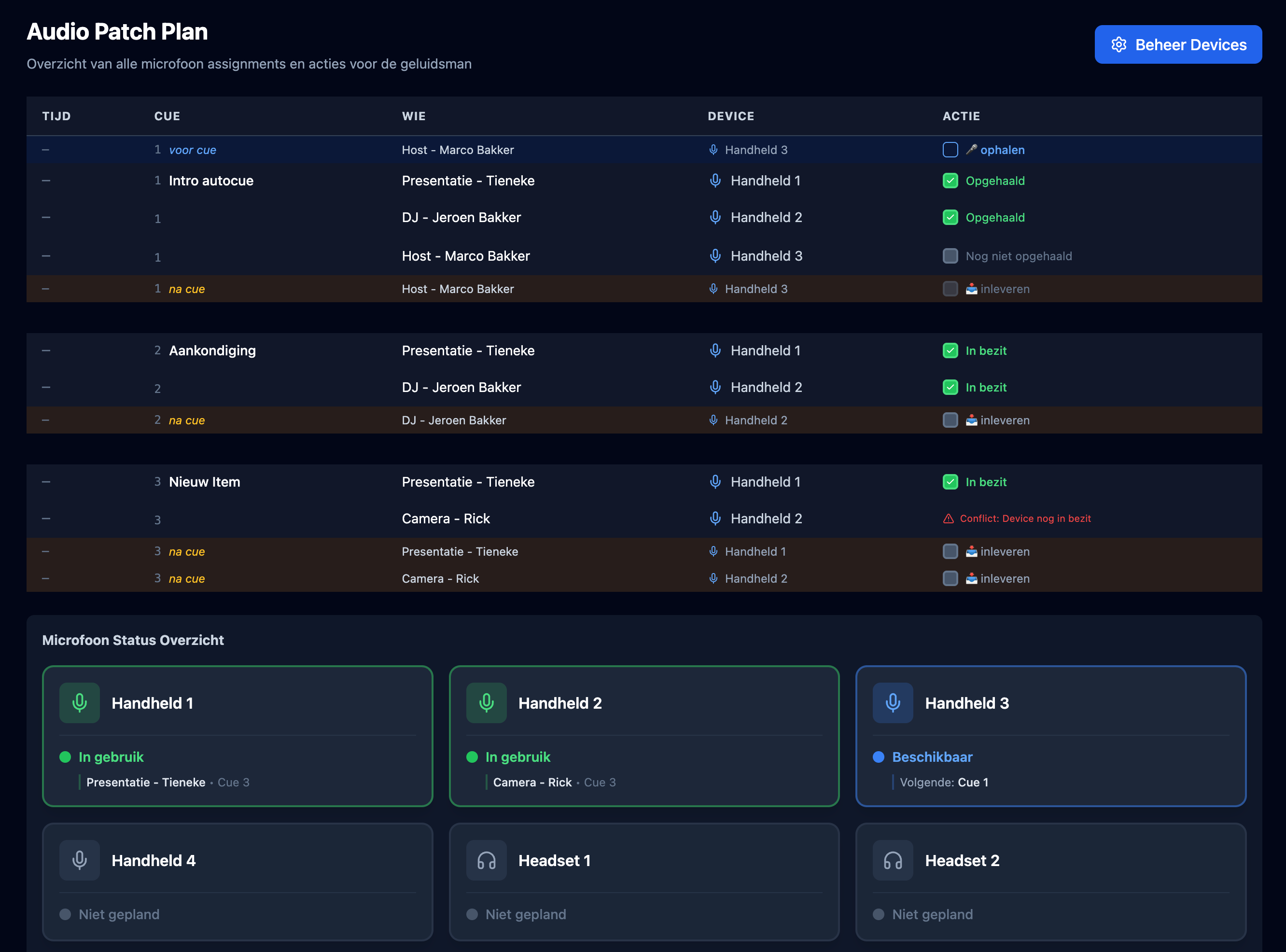
Intelligent Audio Flow Management
ShowCaller automatically calculates when microphones should be picked up and returned. Our intelligent system looks ahead and backward in your rundown to determine the optimal flow.
<strong>How it works:</strong> • Automatic detection of microphone assignments per cue • Look-back logic: checks if a person already had the device • Look-ahead logic: determines if the device is needed again within 30 minutes • Continuity tracking: keeps track of who has which device at any time • Visual audio patch view: see all routing in one overview
No more surprises during the show. You know exactly when which microphone is needed where.
Audio Management Features
Audio Flow Calculator
Automatic calculation of pickup/return moments for all microphones.
Device State Tracking
Real-time tracking of who has which device at any time.
Audio Patch View
Visual overview of all audio routing per cue. Always clear.
Device Inventory
Manage your physical transmitters and microphones. Assign to cast members per cue.
Continuity Status
Tracking of continuity: PICKUP, KEEP, or RETURN per device.
Intelligent Logic
30 minute rule and 2 hour break detection for optimal flow.
Professional Prompter System
Our prompter system consists of two parts: a controller for the prompter operator and a dedicated output for the teleprompter. Perfectly synchronized, always in sync.
<strong>For the operator:</strong> • Full control over scroll speed • Play/pause functionality • Font size adjustments • Mirror mode for teleprompters • Per-cue auto-scroll settings
<strong>For the presenter:</strong> • Clean, readable output • Automatic scrolling with adjustable speed • Real-time updates when cues change • Perfect for any teleprompter setup
We also offer a Presenter Panel for laptops, so presenters can see their own slides with a unique access code.
Presenter & Output Features
Prompter Controller
Full control over scroll speed, play/pause and font size.
Prompter Output
Dedicated output for teleprompters. Clean and readable.
Auto-scroll
Automatic scrolling with adjustable speed. Can be set per cue.
Presenter Panel
Separate view for presenter laptops with unique access codes.
Output View
Dedicated view for external screens. Minimalist and professional.
Real-time Sync
Live synchronization between controller and output. Always perfectly in sync.
Collaborate in Real-time
ShowCaller is built for teams. All changes are synchronized immediately, so everyone always sees the latest version. No confusion, no conflicts.
<strong>Team Features:</strong> • Multi-organization support: work with external teams • Role-based access control: 4 roles (Admin, Showcaller, Crew, Viewer) • Discipline system: assign crew to disciplines (Audio, Video, Lighting) • Email invitations: easily invite team members • Guest organizations: grant access to specific shows • Real-time notifications: push notifications for important updates
Whether you work with 5 or 50 people, ShowCaller scales with you.
Team & Communication Features
Role-based Access
4 roles with different permissions. Always the right access.
Email Invitations
Invite team members via email. 7-day valid links.
Nudge System
Send notifications to crew members. Stand-by, Go, or custom messages.
Push Notifications
Firebase Cloud Messaging for real-time notifications on all devices.
Discipline System
Assign crew to disciplines. Always clear who does what.
Multi-organization
Work with external teams. Guest organizations support.
Cast Portal for Artists
Give your cast members access to their personal cue overview via the Cast Portal. Each artist gets a unique link and sees only their own cues.
<strong>Cast Features:</strong> • Personal cue overview per cast member • Unique links for secure access • Real-time updates when cues become active • Mobile friendly: perfect for artists on the floor • Cast profiles with photo and color • Stage person assignment with microphone types
Artists always know what's expected of them, without having to see the entire rundown.
Complete Call Sheets & Export
Create professional call sheets with all the information your team needs. From location details to call times, from contacts to parking instructions.
<strong>Call Sheet Features:</strong> • Venue information with Google Maps integration • Parking instructions and load-in information • Call times (crew call, doors open, show start, etc.) • Contacts with name, role, email and phone • Custom time labels for flexibility • Print-optimized layout
Export your rundowns to Excel or print them directly. Everything you need for a professional production.
Export & Integrations
Excel Export
Export your rundowns to Excel. Perfect for backup or external editing.
Print Functionality
Print-optimized layout for professional call sheets.
Bitfocus Companion
Integration with Bitfocus Companion for hardware triggers.
Webhook Support
N8N webhook support for automation and integrations.
Call Sheet Editor
Full editor for call sheets with all necessary information.
Google Maps
Direct links to Google Maps for location information.
Globally Available, Accessible Everywhere
ShowCaller supports 12 languages: Dutch, English, German, French, Spanish, Italian, Portuguese, Swedish, Norwegian, Danish, Finnish and Polish. Every user can use the interface in their own language.
Additionally, ShowCaller is a Progressive Web App (PWA), which means you can install the app on your phone, tablet or laptop. Works offline where possible, and always up-to-date with automatic updates.
<strong>PWA Features:</strong> • Installable on all devices • Offline support where possible • Push notifications • Automatic updates • Mobile optimized interface
Perfect for crew members who are on the go or working on location.
Ready to get started?
Start with ShowCaller today and discover all possibilities. Free trial, no credit card required.